Your Australian school pathway · Noble Educators

    Technologies tutoring for Australian students

    Technologies covers design and technologies alongside digital technologies, and in senior years splits into subjects ranging from software development and information processing to food, textiles and engineering-oriented design. All of them assess documented process as heavily as the finished product.

    Book a free demo
    Student working through a lesson in a notebook beside a laptop
    Live, one-to-one learningNoble Educators
    Understand it. Try it. Review it.

    Put your technologies learning into practice.

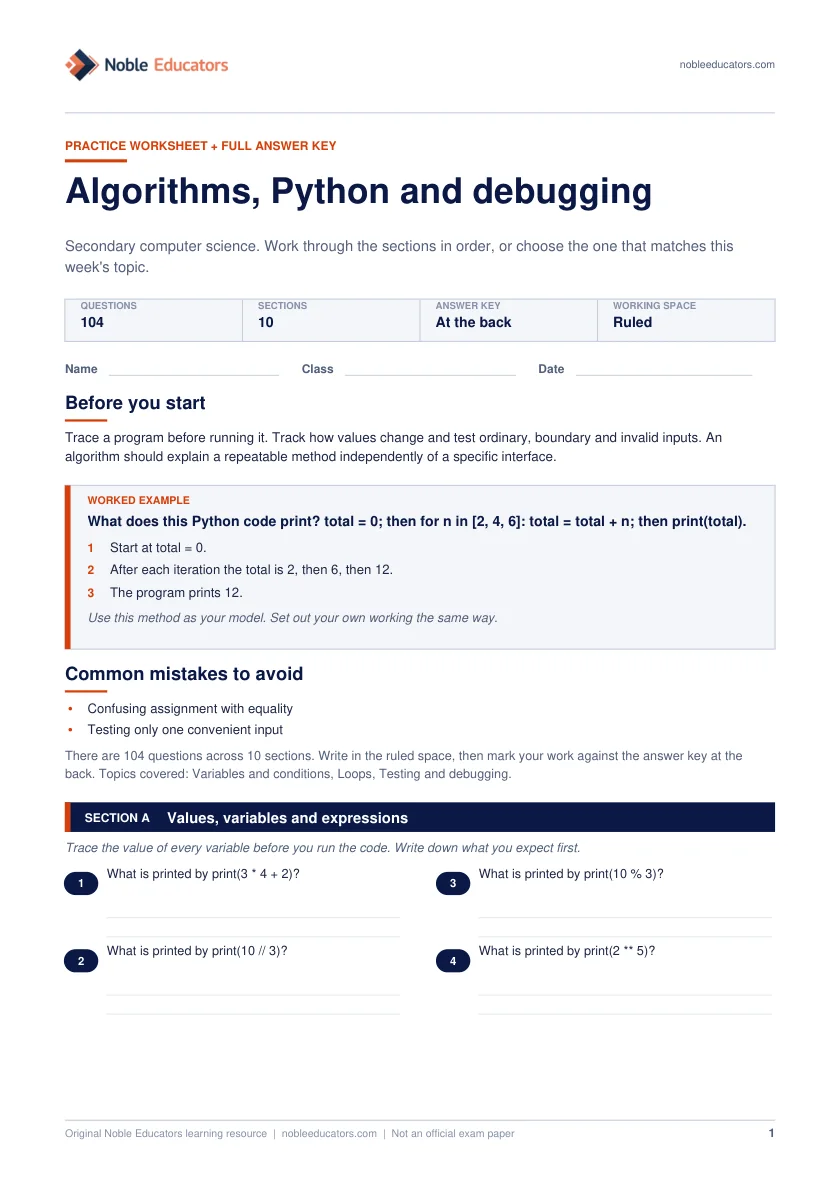
    Worked example · Algorithms, Python and debugging

    What does this Python code print? total = 0; then for n in [2, 4, 6]: total = total + n; then print(total).

    1. Start at total = 0.
    2. After each iteration the total is 2, then 6, then 12.
    3. The program prints 12.
    Common mistakes to check
    • Confusing assignment with equality
    • Testing only one convenient input
    First page of the Algorithms, Python and debugging worksheetPreview the worksheet
    Free PDF · 6 activities · Answers included

    Algorithms, Python and debugging

    Secondary computer science. A focused topic sample with space to work and an answer key for checking your reasoning.

    Download worksheet Preview questions and answers

    Original Noble Educators practice. Not an official exam paper or a complete course syllabus.

    1

    Diagnose before drilling

    The first session finds what is actually breaking down — missing content, a weak method, or lost confidence — because practising the wrong thing wastes a term.

    2

    Plan to the real calendar

    Lessons aim at the student's next school task — a SAC, assessment, trial, NAPLAN window or exam block — not a generic syllabus order.

    3

    Practise under matching conditions

    Timed where the task is timed, written where it is written, with the calculator and formula rules the real assessment uses.

    4

    Report so parents can see it

    After lessons, parents get plain-language notes: what was covered, what improved, and the next piece of work — no jargon, no guesswork.

    Process is the assessed object

    Design subjects assess the full cycle: investigating a need, generating and evaluating options, developing a solution, and evaluating the outcome against criteria the student defined. Digital subjects assess algorithmic thinking, data handling and — in senior programming courses — code that is readable and justified, not merely functional.

    Students consistently underestimate documentation. Working code or a finished product with thin evidence of decision-making scores below a more modest solution accompanied by clear reasoning.

    Technologies learning-area illustration for Australian Curriculum tutoring

    Where students lose marks in technologies

    Jumping to a solution without documenting investigation or alternatives; evaluating against vague criteria rather than the specific ones set at the outset; and, in programming, writing code that works but cannot be explained.

    • Solution chosen before alternatives were evaluated
    • Design criteria left vague, so evaluation is weak
    • Testing documented as 'it worked' without evidence
    • Code that runs but cannot be justified line by line
    • Iteration undocumented, so development is invisible

    How technologies tutoring works here

    Tutors work on the reasoning and documentation the assessment actually rewards: defining criteria properly, evidencing iteration, structuring evaluation, and — in digital subjects — explaining algorithms and data structures clearly. Students bring their own projects; the work and the code stay theirs.

    Two subjects inside a single learning area

    Technologies contains two related but distinct subjects. Design and Technologies has students create solutions using materials, food, textiles, engineering principles and systems. Digital Technologies has them create digital solutions, working with data, algorithms, programming and the systems that store and move information.

    Both are compulsory through the early secondary years under the Australian Curriculum, with schools able to offer them as electives afterwards. That means most students build a genuine foundation in each, and the elective decision at the end of Year 8 is frequently the first real fork in a pathway leading to senior computing or engineering. Families are often unaware the fork exists until the elective form comes home.

    The two subjects share one feature that dominates assessment: the process is the object being marked. Students are judged on how they investigated, generated and evaluated, not only on whether the artefact works. That is genuinely counter-intuitive for students who arrive with a maker's instinct and want to start building immediately.

    • Design and Technologies: materials, food, textiles, engineering, systems
    • Digital Technologies: data, algorithms, programming, digital systems
    • Both compulsory through the early secondary years
    • Process documentation assessed alongside the outcome

    What Design and Technologies actually asks for

    Students work across technologies contexts — engineering principles and systems, food and fibre production, food specialisations, and materials and technologies specialisations — designing solutions to identified needs. In practice a school chooses a subset and builds units around it, so what your child studied depends heavily on the workshop and kitchen facilities available.

    The assessed work is a design brief carried through to an evaluated outcome. Students investigate an existing situation, define criteria for success, generate and compare alternatives, develop and produce a solution, then evaluate it against the criteria they set at the beginning. That last step is the one most often done badly, because vague criteria make honest evaluation impossible.

    Sustainability runs through the subject as a genuine assessment dimension rather than an add-on. Students are expected to weigh the environmental and social consequences of what they make, including material choice, energy use and end-of-life disposal, and responses that treat this as a closing paragraph read exactly that way to a marker.

    • Criteria for success written before designing begins
    • At least two alternatives generated and compared
    • Production steps recorded as they are taken
    • Evaluation measured against the original criteria
    • Sustainability considered at material and disposal stages

    What Digital Technologies actually asks for

    The subject has two strands. Knowledge and understanding covers digital systems, how data is represented, and how it is acquired and interpreted. Processes and production skills cover defining problems, designing algorithms, implementing them as programs, evaluating solutions, and collaborating and managing projects. Both are assessed, and students who enjoy building things sometimes neglect the first one entirely.

    Data representation is the part families least expect. Students learn how text, images, sound and numbers are encoded in binary, why file sizes are what they are, and how compression trades quality against space. It is conceptual work, closer to mathematics than to using software, and it appears in senior examinations.

    Programming begins with visual block environments in primary school and moves to a general-purpose text language, commonly Python, during secondary. The transition is a genuine hurdle, because block environments prevent syntax errors by design, so students meet their first frustrating error messages at the same moment they meet variables, loops and functions in written form.

    • Digital systems: hardware, software and networks
    • Data representation: binary, encoding, compression
    • Algorithms designed before any code is written
    • Programs implemented, tested and then evaluated
    • Project management and collaboration both assessed

    Computational thinking before any code is written

    Computational thinking is the reasoning that makes programming possible, and it can be taught and rehearsed without a computer. It has four recognisable components: decomposition, which breaks a problem into manageable parts; pattern recognition, which notices what repeats; abstraction, which decides what can be ignored; and algorithm design, which sets out an unambiguous sequence of steps.

    Students who struggle with coding usually have an abstraction problem rather than a syntax problem. They can write a line of code and cannot decide what the program needs to know, so they start typing without a plan and debug their way into a shape. Writing the algorithm out in plain language first is the intervention that fixes it.

    Tracing is the companion skill. Working through a short program by hand, tracking the value of every variable line by line, is tedious and it remains the single most reliable way to understand why a loop behaves as it does. The habit also transfers well beyond the subject, since decomposition is the same skill that turns an overwhelming assignment into a sequence of tasks.

    • Decomposition: split the problem into parts
    • Pattern recognition: find what repeats
    • Abstraction: decide what can safely be ignored
    • Algorithm: unambiguous, ordered and complete steps
    • A plain-language plan written before any code

    Learning to program: the sequence that holds

    There is a fairly reliable order to building programming competence, and skipping steps is the usual cause of a student who has completed several courses and still cannot write a program from a blank file. Sequence, variables and input come first, then selection, then iteration, then functions, then data structures such as lists and dictionaries.

    The step where most students stall is the move from following tutorials to writing something unprompted. Tutorial code feels like understanding, because each line makes sense as it is explained, but recognising code and producing it are different capabilities. The remedy is small unassisted projects with a defined goal and no worked solution available anywhere.

    Debugging deserves to be taught explicitly rather than absorbed by accident. Reading the error message, identifying the line, forming a hypothesis, changing one thing and testing again is a discipline. Students left to develop it alone tend instead to change several things at random and hope, which teaches them nothing about the fault.

    • Read the error message before changing anything
    • Change one thing at a time
    • Print intermediate values to see what is happening
    • Test with awkward inputs, not only easy ones
    • Comment the intent rather than the syntax

    Testing and evaluation: the marks students leave behind

    Testing is where students most consistently under-perform against their own ability, because they test to confirm rather than to break. A test showing the program works with the expected input demonstrates very little. A test using an empty field, a negative number, a very long string or a deliberately wrong data type demonstrates thinking.

    The evidence has to be visible. A table listing the test, the expected result, the actual result and the action taken converts work the student already did into marks they would otherwise lose. Annotated screenshots do the same job for physical outcomes and take a couple of minutes each.

    Evaluation is a separate step from testing and answers a different question: not whether it works, but whether it meets the need identified at the beginning, judged against the criteria set then. An honest evaluation that identifies a shortfall scores better than a satisfied one that identifies nothing at all.

    • Test cases chosen to break, not to confirm
    • Expected and actual results tabulated together
    • Fixes recorded beside the failure that prompted them
    • Evaluation measured against the original criteria
    • Shortfalls named honestly and then explained

    How technologies build from Foundation to Year 10

    Early primary work is concrete and playful: identifying how familiar products meet a need, following and describing simple sequences of steps, and using digital tools with guidance. The vocabulary of design, including need, criteria and solution, is introduced through activities children already understand.

    Through the upper primary years students plan properly, produce with more independence, and meet visual programming with branching and repetition. They begin collecting and presenting data, and they learn to consider the people a solution is for, which is the first appearance of user-centred thinking in the sequence.

    Secondary study formalises the brief, introduces text-based programming, and raises the documentation standard sharply. By Year 10 the achievement standard expects students to justify design decisions against criteria, to develop and validate algorithms, and to evaluate solutions for their social, ethical and sustainability implications. The jump in documentation expectation between Year 8 and Year 9 catches students who were producing good outcomes without ever recording how.

    • Foundation to Year 2: needs, sequences, guided digital use
    • Years 3 to 4: planning, visual programming, simple data
    • Years 5 to 6: user needs, branching, repetition, presenting data
    • Years 7 to 8: briefs, text-based code, formal documentation
    • Years 9 to 10: justified decisions, validated algorithms, ethical evaluation

    Senior pathways, and what a report is telling you

    Senior technologies courses vary more between states than almost any other learning area. Software development, information processing and technology, applied computing, engineering studies, design and technology, food technology and textiles all exist under different names and structures depending on the certificate, and some are ATAR-eligible while others are vocational.

    The practical implication is that advice has to come from the school's own subject handbook rather than from general reading. Two courses with similar names in different states can carry very different assessment structures, and a student moving interstate during the senior years needs specific guidance rather than an assumption of equivalence.

    For university pathways, the important point is that computing and engineering degrees usually specify mathematics rather than a technologies subject. Taking software development is useful preparation and rarely a requirement, whereas dropping the calculus-based mathematics course to make room for it is the mistake that closes doors.

    On a report, the comments to weigh are those about independence and documentation. A student described as producing good outcomes with support, or as needing prompting to record their process, is showing exactly the pattern that costs marks in senior assessment, and it is far easier to change in Year 9 than in Year 11.

    • Course names and structures differ by state
    • Some senior courses are vocational rather than ATAR-eligible
    • Mathematics, not technologies, gates most computing degrees
    • Report comments on independence predict senior performance

    Managing a major project across a whole term

    Senior technologies assessment usually centres on one substantial project running most of a semester, and managing that project is itself part of what gets marked. Students who treat the submission date as the only date in the calendar produce a compressed final fortnight and documentation that shows every sign of it.

    The workable approach is a set of internal milestones with dates attached: investigation complete, criteria signed off, alternatives compared, prototype built, testing finished, evaluation written. Each milestone leaves a dated artefact behind, which is simultaneously good practice and precisely the evidence a marker will be looking for later.

    Scope is the other thing students routinely get wrong. An ambitious project half-finished scores below a modest project completed, documented and evaluated properly, because the assessment measures process rather than ambition. Cutting scope early is a sign of judgement and can be recorded in the folio as exactly that.

    Backups and version history belong in this conversation too. A lost file the week before submission is a common and entirely preventable disaster, and a student who can show the history of their work has an audit trail that also protects them in any question about authorship.

    • Internal milestones dated at the start of term
    • Each milestone leaves a dated artefact behind
    • Scope reduced early and the decision recorded
    • Work backed up with version history retained
    Common questions

    What families ask about this

    Most courses assume some junior-secondary programming, though motivated students do start fresh successfully. The bigger predictor is algorithmic thinking and persistence with debugging rather than prior syntax knowledge, and both can be built with focused support before the senior year begins.

    Because the assessment is of the design process, not just the artefact. Markers need evidence of investigation, alternatives considered, iteration and evaluation against stated criteria. A beautiful final product with no visible reasoning cannot be awarded marks for reasoning that was never shown.

    Tutors work through debugging with the student rather than for them — reading errors, forming hypotheses, testing systematically. That is the assessed skill, and it is also an academic-integrity boundary: submitted code must be the student's own work.

    ATAR-eligible technologies courses count like any other subject, and some computing degrees list them as assumed knowledge. They rarely serve as prerequisites in the way mathematics does, so students should keep the required maths level in place alongside them.

    The Australian Curriculum defines design and digital technologies to Year 10, but senior courses diverge considerably: NSW, Victoria and Queensland each name and structure their software, engineering and design subjects differently. Tutors work from the student’s own syllabus rather than a national template.

    Python is the sensible default for Australian secondary students, because it is what most schools use, the syntax is uncluttered and the error messages are readable. The language matters far less than the concepts, and a student fluent in one text-based language picks up a second in weeks rather than months.

    No. Visual environments remove syntax as an obstacle so that sequence, selection, iteration and variables can be learned as ideas, and those concepts transfer directly. The mistake is staying there too long, since a student comfortable with blocks by early secondary should be moving into text, where everything feels different at first.

    Usually because the hours go into building and not into recording. Assessment here is heavily weighted toward evidence of process, so a student who solved a hard problem elegantly and wrote nothing down about how has produced work a marker has no grounds to reward. The fix is a habit rather than more skill.

    With care and clear boundaries. An assistant that produces working code removes exactly the struggle that builds capability, and submitted work must be the student's own under every certificate's rules. Used to explain an error message or a concept after the student has genuinely attempted the problem, it can be useful.

    Visual programming works from around Year 2 or Year 3, and the curriculum introduces it in that range. Text-based languages suit most students from about Year 6 or Year 7, once reading fluency and abstract reasoning have developed enough that syntax errors are frustrating rather than defeating. Interest matters more than age.

    A reliable computer the student can install software on, which rules out some locked-down school devices for home project work. Beyond that, most requirements are free, since a language interpreter, a code editor and a browser cover the digital side. Design and food courses carry material costs, usually listed by the school.

    Set internal milestones at the start of the term and treat them as real deadlines, because the assessment rewards evidence collected along the way and that evidence cannot be manufactured afterwards. A weekly fifteen-minute check on what got documented, rather than on what got built, is usually enough to keep the two in step.

    What sessions cost

    Every learning area is charged at the student's year-level rate rather than by subject, from Foundation through to Year 10.

    Year 3
    $14 AUD per session
    Year 7
    $18 AUD per session
    Year 10
    $21 AUD per session

    Booking a block reduces the per-session rate: 5% from 8 sessions, 8% from 12 sessions, 12% from 15 sessions, 15% from 20 sessions. At 12 sessions, Year 3 works out to $12.88 per session. The first lesson is free and there is no lock-in contract.

    See the full rate card

    How that compares

    Online 1-on-1, a private in-person tutor and a tutoring centre are genuinely different products, and the cheapest is not automatically the right one. These are the typical advertised rates for each in Australia.

    Typical advertised cost per session for different types of tutoring in Australia
    OptionTypical cost per sessionFormat
    Noble Educators$12–$341-on-1, live
    Private in-person tutor$40–$1001-on-1, in person
    Tutoring centre$45–$90Small group, sometimes 1-on-1
    Online marketplace tutor$30–$701-on-1, live

    Ranges describe typical advertised rates for each type of tutoring in Australia and are provided as general guidance only. They are not quotes from specific providers, and actual prices vary by tutor, year level, subject, location and session length. Compare current published pricing directly before deciding.

    See the full cost comparison
    For parents

    Clarity before you book, visibility after every lesson.

    What to share before the first lesson

    The tutor match works from evidence, not a job title. Anything from the list below gives the first session a concrete starting point instead of a cold diagnostic.

    • The most recent school report or assessment result
    • The current task sheet, assessment notice or study design topic
    • Any teacher feedback, and the topic where confidence broke
    Send it through the enquiry form

    What you will see after every lesson

    Progress a parent cannot see is progress they cannot support. Reporting is part of the service, not an add-on you have to chase.

    • What the lesson covered and what changed, in plain language
    • The next piece of practice and why it comes next
    • A direct line to ask questions between lessons
    See how the whole process works

    Check the official source

    Assessment rules, dates and syllabus documents change. Whenever a decision depends on them, confirm the detail with the body that sets it — these are the official sites for this page.

    Noble Educators is an independent tutoring provider and is not affiliated with, endorsed by or accredited by any of these organisations. Their sites are always the source of truth for official requirements.

    Your next step with Noble Educators

    Let’s find your way forward.

    Tell us your year level, school pathway and questions. Discuss a suitable tutor, lesson fees and a schedule that works for you.

    Book a free demo

    Start with a free demo

    Find the right Australian tutor this week.

    Tell us the student's state, year level, subject and goal. We will recommend a tutor and a practical first lesson plan.

    Call now